A gelato-aware assistant that can rebalance recipes, suggest swaps, and auto-fill custom ingredients from a description or a barcode.
Gelato Maestro's AI features run on an external AI provider that you connect once in Settings. Once a provider is set up, two assistants become available:
The Recipe Assistant inside Recipe Details — helps you design gelato recipes, balance them, troubleshoot mixes, and answer questions on gelato-making in general.
The Ingredient Assistant inside Adding or Editing an Ingredient — helps you add new ingredients and answers questions about the process of filling in values, from gelato ingredient theory to filling in the details and pulling data from OpenFoodFacts.
Look for the sparkle badge throughout the app — it marks AI-powered actions.
Read this first — the AI can be wrong
Large language models occasionally invent values, misclassify ingredients, or balance a recipe in a way that's mathematically valid but culinarily strange. See When the AI is wrong below. Every value the AI proposes remains editable, and you always get a Keep / Discard review step before changes are committed.
Setting up an AI provider
Gelato Maestro does not run an AI model itself. You bring the brain: pick a provider, paste an API key (or sign in), and the assistants light up. Open Settings › AI Providers to get started.
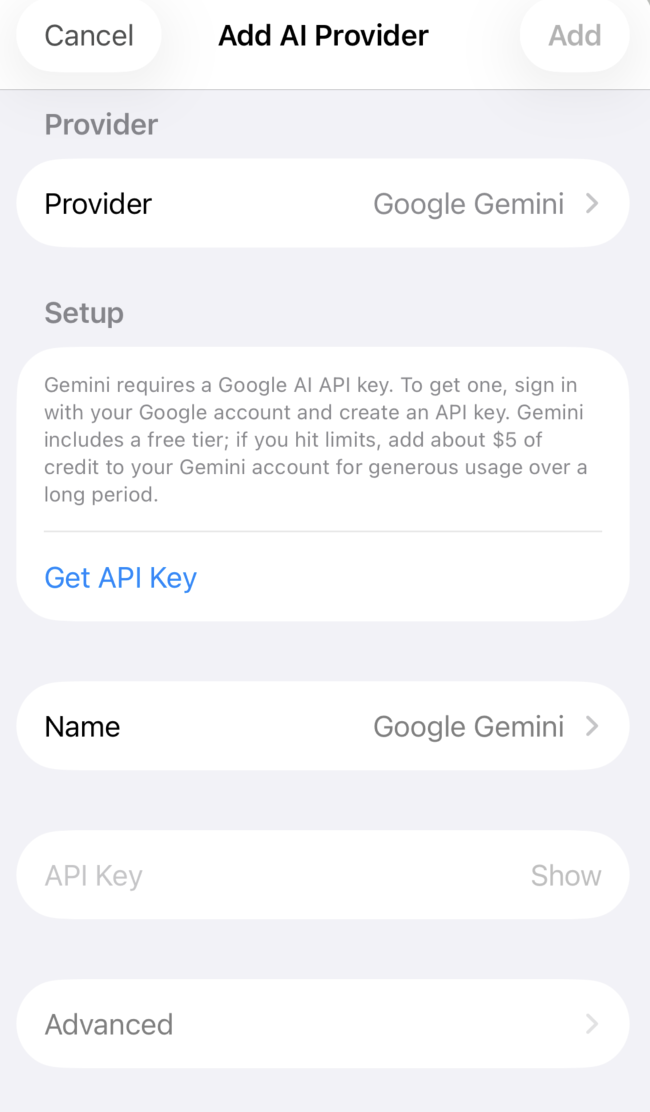
The Add AI Provider sheet — pick a provider, follow the setup hint, paste your key (or sign in).
Which provider should I pick?
The same advice is shown inside the app, in the "New to AI? Start here" card on the AI Providers screen:
You already pay for ChatGPT (Plus, Pro, or Team) → pick OpenAI Subscription. This signs you in with your existing ChatGPT account. Easiest path; no API key, no separate billing.
You don't have a ChatGPT subscription → try Google Gemini with an API key. Gemini ships with a generous free tier; if you hit it, about $5 of credit lasts a long time.
You already use Anthropic or Mistral → pick that one. Otherwise, no need.
Supported providers
Provider
How to sign in
Notes
OpenAI Subscription
Sign in with your ChatGPT account
Uses your existing Plus / Pro / Team plan. No API key.
Open Settings › AI Providers and tap Add AI provider.
Pick a provider from the Provider picker. The Setup panel below updates with provider-specific instructions and a Get API Key link that opens the right page in your browser.
Click Get API Key, create the key on the provider's site, and copy it.
Paste the key into the API Key field. (For OpenAI Subscription, use the Sign in button instead.)
Optional: rename the source in the Name field (e.g. "Personal Gemini"). Useful if you add multiple providers.
Optional: open Advanced to pick a specific model and reasoning effort. The default is fine for most users.
Tap Add. Gelato Maestro tests the connection by fetching the model list. If it succeeds, the provider appears in the list.
Your existing app login isn't a key
Being signed into ChatGPT, Claude or Gemini in their own apps does not authorise other apps to use them. With the exception of OpenAI Subscription (which uses the OpenAI account login flow on purpose), every provider here needs an API key you create on the provider's website.
Subscription vs. API key
Subscription — sign in with your existing account (currently only OpenAI). You pay the flat monthly fee you already pay; Gelato Maestro doesn't add anything.
API key — a secret code you create on the provider's website. The provider bills you per request. Start with about $5 of credit, watch your usage, and top up only if needed. A full recipe rebalance uses a few cents at most on a modern model.
The Recipe Assistant
Once a provider is configured, the AI button becomes active inside Recipe Details. Open the assistant and you'll see a chat field with a placeholder like "Ask your assistant to help improve this recipe."
What it can do
The assistant is not a generic chatbot. It has direct access to your recipe through a small set of gelato-specific tools — it can read the current ingredients and KPIs and rewrite them in one go. Practical things you can ask:
"Design a Sicilian pistachio gelato with a generous pistachio paste ratio, that scoops softly straight out of a display freezer." — composes a full recipe from scratch, picking the structural ingredients and proportions that match your scooping and texture goals.
"This mix freezes too hard out of the blast freezer and turns icy after a day in the display. Diagnose and fix it without changing the flavour." — investigates the current recipe, works out the likely cause, and rebalances to fix the texture while keeping the dominant flavour ingredient untouched.
"My chocolate gelato is grainy and chalky on the palate. Rework it." — figures out which ingredients are likely responsible, proposes a rebalance, and explains the reasoning so you learn from it.
"Build me a hazelnut gelato using only ingredients I currently have in stock." — consults your ingredient library, picks the subset with stock on hand, and composes a balanced recipe entirely from what you already have.
"Why is my gelato sticky and slow to melt? What would change if I dropped the dextrose?" — answers diagnostic and theory questions without necessarily changing the recipe.
How a conversation runs
You write a request. The clearer the prompt, the better the result. Say what you want, what you want to avoid, and any constraints — a target weight, a flavour to preserve, ingredients you don't have on hand.
The assistant works step by step, with empirical tools. It isn't free-styling: it uses the same balancing and analysis tools the app exposes to you. It reads the recipe, tries a change, checks the result, adjusts, and tries again. You can watch every step appear in the chat as it happens.
You can pause and steer at any moment. If the assistant is heading in the wrong direction, stop it and send a new instruction — "actually keep the pistachio paste ratio where it is", "don't touch the milk powder", "go in a softer direction instead". It picks up from there with the new guidance.
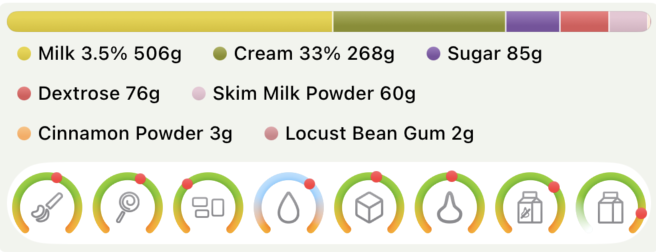
It finishes with a structured summary. The full proposed recipe — every ingredient with its ratio, the resulting gauges, and a short note on what changed and why.
You decide. Tap Keep to commit the change to your recipe, or Discard to throw it away and leave the original untouched.
The final summary card — every ingredient with its ratio, plus the resulting gauges. Use Keep to commit or Discard to revert.
Tips for good results
Be specific. "Make this more pistachio" is vague; "Raise the pistachio paste ratio and rebalance" is something the assistant can act on directly.
Use ingredient flags first. If you've already marked your inclusions with Use for balancing = off and set Dosage limits, the assistant inherits those constraints and won't waste tokens fighting them.
One change per request. Compound requests ("make it less sweet, swap the milk and cut the cost") work — but a focused request tends to land better, and you can review one change at a time.
The Ingredient Assistant
When the Recipe Assistant needs an ingredient that doesn't exist in your library yet — or when you're creating a custom ingredient by hand — Gelato Maestro tries to fill in the composition fields for you. This is the Ingredient Assistant.
The provider pill shows which AI model will be used when you send a prompt. You'll see one pill for each provider you've configured — for example, if you have both OpenAI and Google Gemini set up, two pills appear, and you tap the one you want to use. The same pill appears in both the Recipe Assistant and the Ingredient Assistant. Tap the chevron on a pill to open a menu and pick a different model from that provider.
What happens when a new ingredient is needed
OpenFoodFacts lookup. The assistant searches OpenFoodFacts — a free global product database — by name.
One clear match → the ingredient is created automatically with the OpenFoodFacts composition (water, sugars, fats, protein, fibre, calories).
Several candidates → you see a choice card with 2–3 candidates ("Hazelnut paste — Generic", "Hazelnut paste — Brand X", …) and pick the closest match. The pick is then created from OpenFoodFacts.
No OpenFoodFacts match, or OpenFoodFacts is unreachable → the AI is asked, in an isolated call, to estimate the composition. Returned values are validated (clamped 0–100%, totals checked) before the ingredient is created.
If even the AI fallback fails to produce a valid composition, the assistant tells you and leaves the recipe unchanged.
What the assistant fills in
For a new custom ingredient the assistant fills the same fields you'd otherwise enter by hand in Adding or Editing an Ingredient:
Water, total sugars (sucrose, dextrose, fructose, lactose), total fats, MSNF, fibre, protein.
Calories per 100 g.
Derived KPI contributions (PAC, POD) — computed from the sugar/fat breakdown, not from the AI directly.
Every value remains editable in the ingredient detail view. If the AI got something wrong — a fruit pulp marked as 100% water, a dairy product missing its MSNF — you can correct it on the spot.
OpenFoodFacts is the better source
Whenever possible, prefer the OpenFoodFacts result over the AI fallback. OpenFoodFacts has real label data scanned by a community of millions; the AI has to estimate. The clearest way to get an OpenFoodFacts hit is to scan the product barcode with the barcode scanner on iOS or to use the exact product name printed on the label.
When the AI is wrong
Treat the AI as a capable but fallible assistant — not as a source of truth. The model can:
Invent ingredient values. The fallback resolver is asked to estimate composition when OpenFoodFacts has no data. Estimates can be off, sometimes badly. Always sanity-check fat and sugar percentages for any AI-filled ingredient.
Pick the wrong OpenFoodFacts product. When several candidates are similar, the choice card lets you pick — but if you accept too quickly, the assistant may inherit values from a product that isn't the one you actually use.
Balance to the gauges but not to taste. Like Auto-balance, the assistant optimises against the KPI ranges in Settings › Gauges. It has no opinion on whether 60% lemon juice belongs in a sorbet — if the numbers fit, it considers the recipe valid.
Mis-classify culinary ceilings. The assistant doesn't always know that lemon juice has a sane maximum, that espresso is bitter, or that alcohol limits scoopability. Set sensible Dosage limits and Use for balancing flags on your custom ingredients first — the assistant inherits them.
Fail mid-flight. Rate limits, network errors, or model issues can interrupt a run. Errors appear as red bubbles in the chat with a human-readable cause. Re-send the request, or switch to another configured provider.
Built-in safety nets
Gelato Maestro tries to make AI mistakes recoverable rather than destructive:
Keep / Discard review. No change is committed to your recipe until you tap Keep. Discard leaves the original recipe untouched.
Choice cards for ambiguity. When OpenFoodFacts returns multiple candidates, you pick — the assistant never silently guesses.
Round cap. The assistant can only adjust the recipe a handful of times per request before it must produce a final summary. No runaway loops.
Validation. Composition values returned by the AI fallback are clamped to sane ranges and rejected if they don't add up to a coherent ingredient.
Editable everywhere. Every AI-supplied number — composition, ratio, classification — can be edited by hand afterwards.
Privacy
When you use any of the supported providers (OpenAI, Anthropic, Gemini, Mistral), your prompts and the recipe data the assistant reads are sent to that provider's servers under their terms of service. Review the provider's privacy policy if this matters to you.
Switching, removing or editing a provider
Each provider you've added shows as a row in Settings › AI Providers. Tap a row to open the edit screen — you can rename it, replace the API key, pick a different default model, or remove it entirely. Removing a provider deletes the stored key from your device; no request is sent to the provider.
You can have multiple providers configured at the same time — for example an OpenAI subscription for everyday work and Google Gemini as a backup. All configured providers will be available in the assistant.